
|
|
|||||||
| View Poll Results: Who has the long term edge? Ivey v. aba (NLHU) | |||
| Ivey |
   
|
34 | 30.09% |
| aba |
  
|
42 | 37.17% |
| BBV |
  
|
37 | 32.74% |
| Voters: 113. You may not vote on this poll | |||
 |
|
|
Thread Tools | Display Modes |
|
#562
 04-24-2007, 04:46 PM
|
|||
|
|||
 Re: Riina Cards
[ QUOTE ]
Hey yak- If I am messing around in photoshop and make some cards, and decide I want to save, what do I do, step by step? Assume it's in .psd format and I have the IrfanView program. Do I have to save the cards with Irfan too? And what 'color' do I click if it asks me for transparency? [/ QUOTE ] Resize to appropriate sizes using photoshop, resizing with image size.. using sharp resize option, saving each to the appropriate name. I don't use ifranview at all. And I don't know what you mean by if it asks for transparency, it never asked me for that in photoshop. Its just no color? cards0.png - (420x252) cards1.png - (504x300) cards2.png - (588x354) cards3.png - (700x420) cards4.png - (840x504) cards5.png - (980x588) cards6.png - (1176x708) cardsmall.png(407x259) 
|
|
#563
04-24-2007, 05:41 PM
|
|||
|
|||
|
Re: Riina Cards
Any chance you would be willing to share / post your PSD files so those of us with PS could use yours as a starting point to modify and create our own? Might save you a few requests. [img]/images/graemlins/grin.gif[/img]
|
|
#564
04-24-2007, 06:06 PM
|
|||
|
|||
|
Re: Riina Cards
[ QUOTE ]
Any chance you would be willing to share / post your PSD files so those of us with PS could use yours as a starting point to modify and create our own? Might save you a few requests. [img]/images/graemlins/grin.gif[/img] [/ QUOTE ] The only one I have (sorry for the million layers): 1.2 http://www.sendspace.com/file/ixh6fp
|
|
#566
04-24-2007, 06:17 PM
|
|||
|
|||
|
Re: Any Full Tilt Mods Yet? (1 included)
[ QUOTE ]
Okay here goes. The layout many asked me for via pms. First off, i apologise for having waited so long in putting it up. When i first started out, i wanted to do the full works including chips and about every button imaginable. However, after putting lots and lots of hours i got somewhat fed up with it, and let it go. Didn't wanted to post it either, as im a perfectionist and i didn't knew if i got excited later on so i could deliver a full package. Well the excitement hasn't come back, and both college as some personal circumstances have taken up my time since then. I think/hope however, lots of people will appreciate the upgrade this mod can make their experience as is. Sorry, lots of rambling, so nothing further. Okay just as a p.s, if you use it and like it, any positive comments won't go unnoticed. I'd appreciate it [img]/images/graemlins/grin.gif[/img] Into the graphics/table/elements folder: 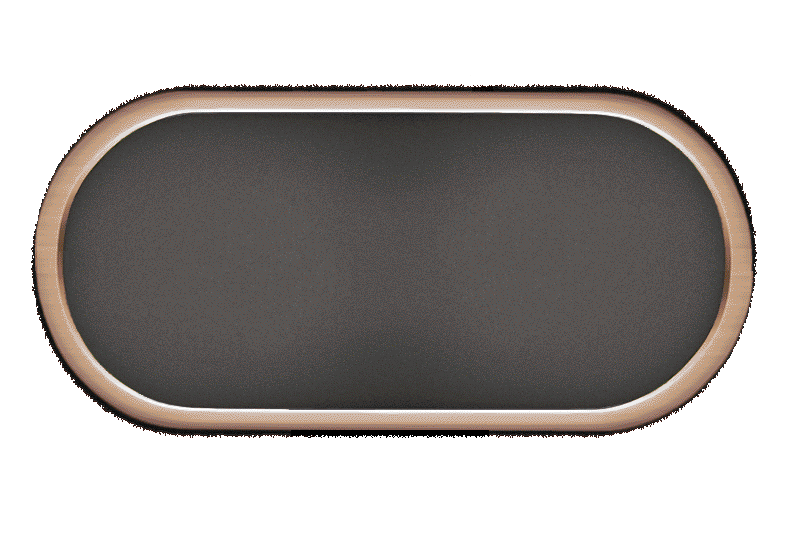 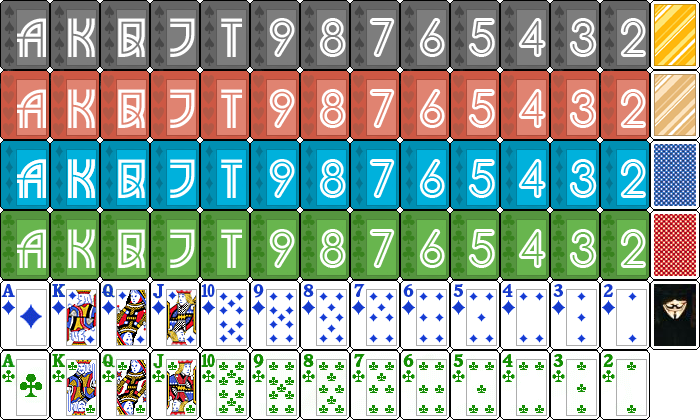  Important note!: The new chipcover, will make the right half of the table as one big clickable optionbutton. If you don't like that, i'd suggest editing the existing coverfile into an empty image. For me as a NLplayer, who constantly rebuys to the max i've found it pretty useful however, so decide for yourself Into the graphics/table/avatars/ folder:   ENJOY! [img]/images/graemlins/smile.gif[/img] [/ QUOTE ] I copy/pasted the images for the box that goes around the player's name on the table but I cannot get rid of the black border and it is showing up on the table whenever it is a player's turn for action. Does anyoneknow how to fix this?
|
|
#567
04-24-2007, 06:46 PM
|
|||
|
|||
|
Re: Riina Cards
"resizing with image size.. using sharp resize option,"
i dont see that on my PS 7.0.... will it matter? do i need to upgrade to CS or CS2? - i think i have a copy of it or can get one.
|
|
#569
04-24-2007, 06:56 PM
|
|||
|
|||
|
Re: Riina Cards
Wow - those are very nice - I like em a lot now. The onlything I would like, and perhaps I can do this myself (i will let u know), is for the spades to not be a grey-shade. I use grey tables a lot of the time, and i would rather have some more contrast then.
And can someone, for Pete's sake, tell me how to post my images in this forum thread [img]/images/graemlins/tongue.gif[/img]
|
|
|
|


 Linear Mode

