
|
|
#43
 10-17-2006, 07:06 PM
|
|||
|
|||
 Re: All Black Mod
[ QUOTE ]
it took me some time but here's what I have.... I will upload it if anyone wants it Still clueless on the card backs but I imagine I must edit the PS.bat file 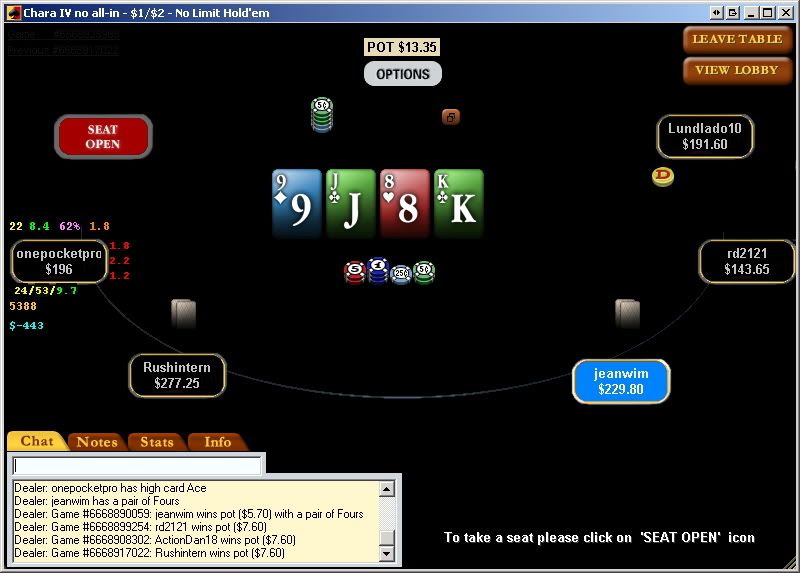 [/ QUOTE ] please upload the files [img]/images/graemlins/smile.gif[/img]im very interested 
|
|
#44
10-17-2006, 08:04 PM
|
|||
|
|||
|
Re: All Black Mod
AEKD: so...how'd you figure out the card-back issue? I'm curious too? (Is it just a matter of running the Stars.exe and not the Starsupdate.exe file?)
More importantly, I would be very grateful if someone could explain the XThemes folder to me. I have read every Stars mod post from the past 6 months, and not one of them explains wtf the XThemes folder is or does. Is it just a new folder that I have to create in the PS directory myself? Skoal's old post tells me that i also need to modify some xthemes.ini file...but where is that file? Who creates is? The whole xthemes thing is confusing to me... EDIT: i found the xthemes zip file that skoal hosted a few months ago; i d'led it and put it in my stars folder...is that all there is to it? i still don't really understand just what it does...
|
|
#45
10-17-2006, 08:28 PM
|
|||
|
|||
|
Re: All Black Mod
Hi TeddyFBI,
[ QUOTE ] AEKD: so...how'd you figure out the card-back issue? I'm curious too? (Is it just a matter of running the Stars.exe and not the Starsupdate.exe file?) [/ QUOTE ] Yes, runnning stars.exe not starsupdate.exe will stop card backs being "repaired", but means you won't get updates immediately - better to use a .bat file (like old-skool stars mods) to: copy old images back in - > run starsupdate -> copy new images back in. [ QUOTE ] More importantly, I would be very grateful if someone could explain the XThemes folder to me. I have read every Stars mod post from the past 6 months, and not one of them explains wtf the XThemes folder is or does. [/ QUOTE ][ QUOTE ] Is it just a new folder that I have to create in the PS directory myself? Skoal's old post tells me that i also need to modify some xthemes.ini file...but where is that file? Who creates is? The whole xthemes thing is confusing to me... [/ QUOTE ] The "xthemes" folder is the location where third-party mods (like ours) are stored, the "themes" folder is only for use by official pokerstars.com themes. Any files in the "themes" folder will be hash checked & "repaired" if need be when running starsupdate.exe, the xthemes folder will remain untouched. Skoal's mod should create the xthemes folder for you, if not, there is no harm in creating it yourself. xthemes.ini is a file that describes to the stars software what themes are present in the xthemes folder, so they can be displayed by the theme browser and subsequently selected by the user. It specifies the name of the themes, where they can be found and from which default theme they inherit their graphics. In the xthemes folder, there should be an xthemes.ini file, and folders containing themes. My xthemes folder contains only the xthemes.ini file, and a folder called skoal24k.pokerstars.com. In this folder is a folder called skoal24k, within here is the files that make up the mod, e.g bg.bmp, label folder, action folder etc. I have only the skoal24k theme installed, so my xthemes.ini looks like this: <font class="small">Code:</font><hr /><pre> [[email protected]] name=skoal2k4 folder=skoal2k4.pokerstars.com\skoal2k4 [email protected] </pre><hr /> If I had multiple user-made themes installed, they would be listed in a similar manner to the above in the xthemes.ini file. I hope this helps, dave.
|
|
#46
10-17-2006, 09:26 PM
|
|||
|
|||
|
Re: All Black Mod
what _dave_ said....
for the rest of my mods I modified the simple theme....... as you can see in dave's .ini file skoal's Xtheme uses the simple theme as its base ...then ran pokerstars.exe not the update, so the .bat file has to be modified Same deal for the card backs my backs now appear as...  here's the one I posted above, I've changed a bit from then... http://rapidshare.de/files/37133413/...rking.rar.html
|
|
#47
10-17-2006, 09:52 PM
|
|||
|
|||
|
Re: All Black Mod
OK here's my final.....
I've made a zip which has all the path's correctly there from Pokerstars..... on downward.. The zip contains the modified simple theme and the modified skoal theme. I wanted empty seats to appear distinct and the cards to be brighter. Here's the shot  link http://rapidshare.de/files/37156237/...sAEKD.zip.html
|
|
#48
10-17-2006, 11:33 PM
|
|||
|
|||
|
Re: All Black Mod
Excellent -- now I just want to know how to edit the color on the back of the deck -- what files do I need to mod?
I just want something that will stick out more than what you see below (the table i created): 
|
|
#49
10-17-2006, 11:56 PM
|
|||
|
|||
|
Re: All Black Mod
[ QUOTE ]
now I just want to know how to edit the color on the back of the deck -- what files do I need to mod? [/ QUOTE ] Depending on the deck u use, it will be either: Program Files\PokerStars\Gx\chips&deck\default\back.bm p or maybe Program Files\PokerStars\Gx\chips&deck\default\smback. bmp or for the waffle (simplified) deck: Program Files\PokerStars\Gx\chips&deck\simple\back.bmp dave.
|
|
#50
10-18-2006, 02:57 AM
|
|||
|
|||
|
Re: All Black Mod
AEKDBet: Awesome. I think im gonna play Stars now [img]/images/graemlins/wink.gif[/img]
|
 |
|
|


 Linear Mode

