
|
|
|
|
#1
 05-30-2006, 09:33 AM
|
|||
|
|||
 Logitech Harmony Universal Remote Controls
Anyone ever have an experience with these things? I saw a "Product Watch" commercial on my Tivo recently about this, and of course, it looks cool in the commercial.
This is the Harmony 880. 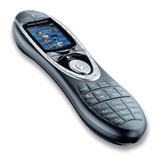 Here is a listing of all the Harmony remotes on the Logitech website. 
|
|
#2
05-30-2006, 09:37 AM
|
|||
|
|||
|
Re: Logitech Harmony Universal Remote Controls
I just got one last week. The Harmony 880 the verdict so far is meh.
Does not work with one appliance I have (remote ceiling fan). Slow to change channels on my cable box DVR, assumes everything is off when you choose a function like "Watch DVR" or "Watch DVD". To be fair I need to play with it more and see if I can alter it to suit my needs. I plan on trying to change the setup today and I'll post a report tomorrow.
|
|
#3
05-30-2006, 09:41 AM
|
|||
|
|||
|
Re: Logitech Harmony Universal Remote Controls
i recently got the harmony 659 and i love it
quickly told it my device manufacturer/models and now i just hit 'watch tv' or 'watch dvd' and it turns on my receiver, my tv (switches to correct component input) and the dvd player or cable box...u can get fancier with it and have it do pretty much anything tho remotecentral is a great dot com site resource for remotes in general and harmony's (under logitech) as well
|
|
#4
05-30-2006, 11:08 AM
|
|||
|
|||
|
Re: Logitech Harmony Universal Remote Controls
|
|
#5
05-30-2006, 03:34 PM
|
|||
|
|||
|
Re: Logitech Harmony Universal Remote Controls
[ QUOTE ]
Should've read this astroglide post [/ QUOTE ] thanks for the props [img]/images/graemlins/smile.gif[/img] cliff notes: the harmony 680 is an excellent and affordable universal remote, and it is also much better than the harmony 880
|
|
#6
05-30-2006, 03:55 PM
|
|||
|
|||
|
Re: Logitech Harmony Universal Remote Controls
The best remote control site on the web is:
http://www.remotecentral.com/ I have this remote: http://www.remotecentral.com/mx700/index.html I'm very satisfied with it. Fully programmable, easy to use. Lots of macros. It doesn't assume anything about the state the appliance is in. You tell it to turn on or off each device (hopefully, your devices have separate power on and power off commands). The programming isn't web based. You download a program to your computer and program the remote via serial port.
|
|
#7
05-30-2006, 02:35 PM
|
|||
|
|||
|
Re: Logitech Harmony Universal Remote Controls
hell,
what do you mean "doesn't work"? if it's just not compatible with the type of signal needed to be sent, you should have known that ahead of time o/wise, what do you mean? it doesn't assume everything is off. it assumes everything is in the state which IT left them in. so if you turn off your TV by hand at some point, it doesn't know you did that. i don't know how you would expect it to. i've had mine a while and haven't really spent the time to configure it fully, and am happy with it. citanul
|
|
#8
05-30-2006, 03:21 PM
|
|||
|
|||
|
Re: Logitech Harmony Universal Remote Controls
[ QUOTE ]
hell, what do you mean "doesn't work"? if it's just not compatible with the type of signal needed to be sent, you should have known that ahead of time o/wise, what do you mean? [/ QUOTE ] I mean I have a remote for the fan now, other models from the fan company are listed but this one is not in the online listing. It also won't learn it for some reason. I'll give this another go when I get home tonight. [ QUOTE ] it doesn't assume everything is off. it assumes everything is in the state which IT left them in. so if you turn off your TV by hand at some point, it doesn't know you did that. [/ QUOTE ] Makes perfect sense, I just made a poor assumption that it always sent a power signal for the components. Thanks.
|
|
#9
05-30-2006, 03:25 PM
|
|||
|
|||
|
Re: Logitech Harmony Universal Remote Controls
Hell,
Yeah, I odn't know what's up with it not being able to learn your codes, as long as it's IR, I would think it could learn it. If your fan has a radio remote or something you could just be SOL. WRT the power codes thing. Many devices have different on and off codes, but many just have one code for "power toggle." If it's just got one, then almost all devices don't have a "send signal to check state" functionality. citanul
|
|
#10
05-30-2006, 03:25 PM
|
|||
|
|||
|
Re: Logitech Harmony Universal Remote Controls
The delay between commands is adjustable, somewhere deep in the configuration. If I remember correctly it defaults to 500ms which is way too much, and allows you to change the delay in 100ms increments. I reduced mine to 100ms and it's much less of an issue.
|
 |
| Thread Tools | |
| Display Modes | |
|
|


 Hybrid Mode
